RetroAchievements Integration
TruchiEmu integrates with RetroAchievements.org to track and unlock achievements in classic games.
Overview
RetroAchievements turns classic games into a completion challenge. Log into your RetroAchievements.org account and TruchiEmu will track your progress, unlock achievements as you earn them, and share what you're playing with the community. A Hardcore Mode is available for purists who want the leaderboard-eligible run.
What You Get
- Achievement Tracking: Unlock trophies for in-game feats beat the boss without dying, find the secret, max the combo, and so on
- Rich Presence: Your current game and activity (for example, which level you are on) are shared with the RetroAchievements community automatically
- Hardcore Mode: Earn achievements the way the leaderboard counts them no save states, no rewinds, no slow motion, no cheats. Off by default; opt in from the Achievements panel
- In-Game Notifications: Achievement unlocks pop up as a pill on the game window so you don't miss them
- Profile & Game List: Your unlocked achievements sync to your RetroAchievements.org profile
Step-by-Step Configuration Guide
Initial Setup
-
Create RetroAchievements Account
Visit RetroAchievements.org and create a free account. Verify your email address to unlock full functionality.
-
Configure TruchiEmu Credentials
In TruchiEmu, go to
Settings → Achievements → Accountand enter your RetroAchievements username, password, and Web API key. Both the password and the key are required. Generate your Web API key from the RetroAchievements website under Settings (Control Panel).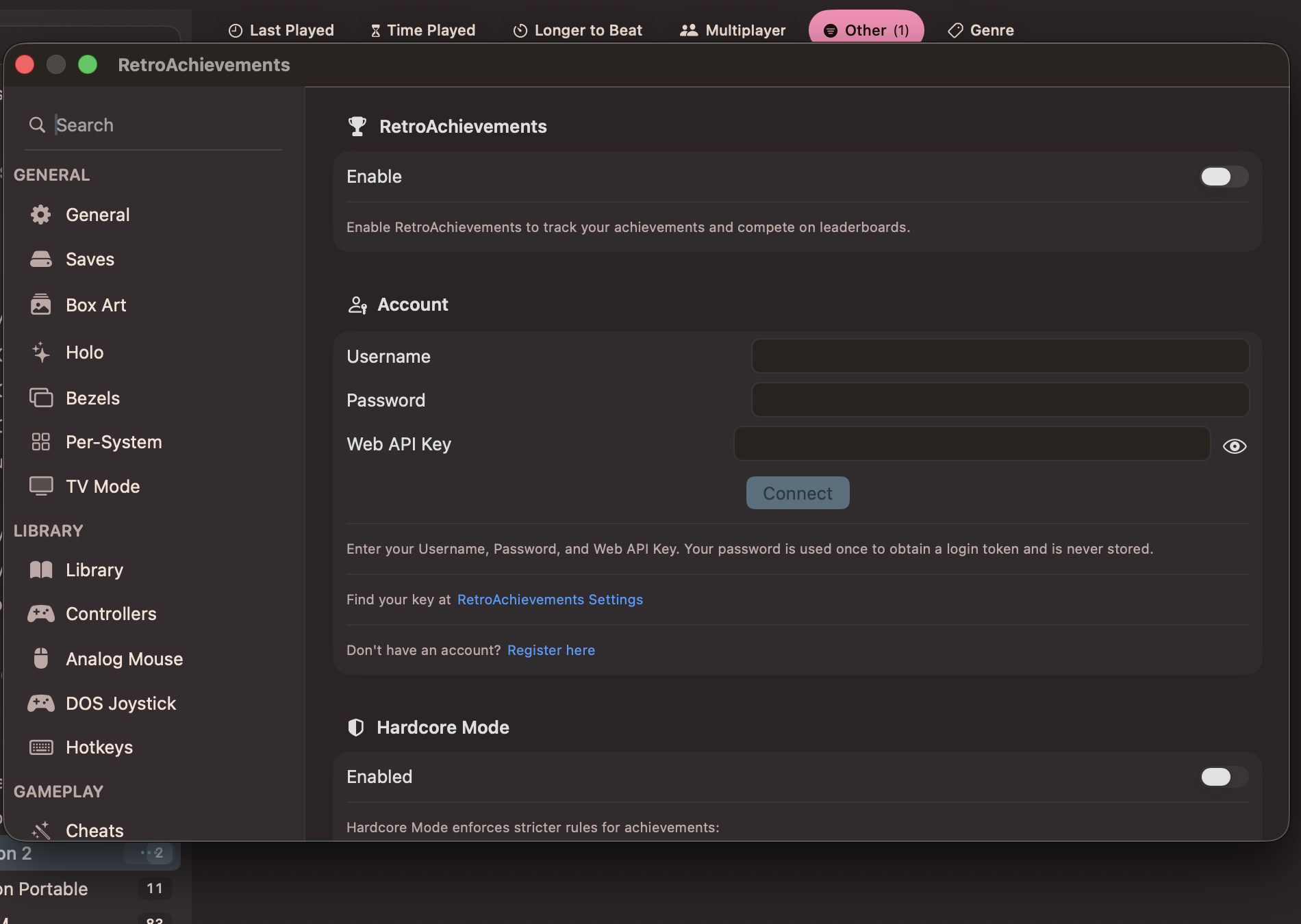
-
Connect
Click "Connect" to log in. After successful authentication, you'll see a green "Connected" indicator with your user stats.
-
Enable RetroAchievements
Toggle "RetroAchievements" in the main Achievements settings panel to enable or disable the integration.
-
Rich Presence
Rich presence is displayed automatically during gameplay when RetroAchievements is enabled. The current activity message is shown in the Rich Presence section of the Achievements settings. Messages are generated automatically from the game's rich presence script — no manual configuration needed.
Game-Specific Setup
-
Load Supported Game
Open a ROM for a supported system. TruchiEmu automatically detects if the game has achievements available.
-
View Achievement List
Open the achievement list from the game menu to see all available achievements for the current game.

-
Track Achievement Progress
Achievement progress is displayed during gameplay with on-screen notifications when conditions are met.