TruchiEmu Features
Discover the powerful features that make TruchiEmu the premier emulation experience on macOS
TV Mode
TV Mode is TruchiEmu's couch-friendly, full-screen library experience. Flip to TV Mode from the View → TV Mode menu (or a button on the game-toolbar) to browse your entire collection without a mouse.
TV Mode carousel in motion — glide through systems with a gamepad (video, no sound)
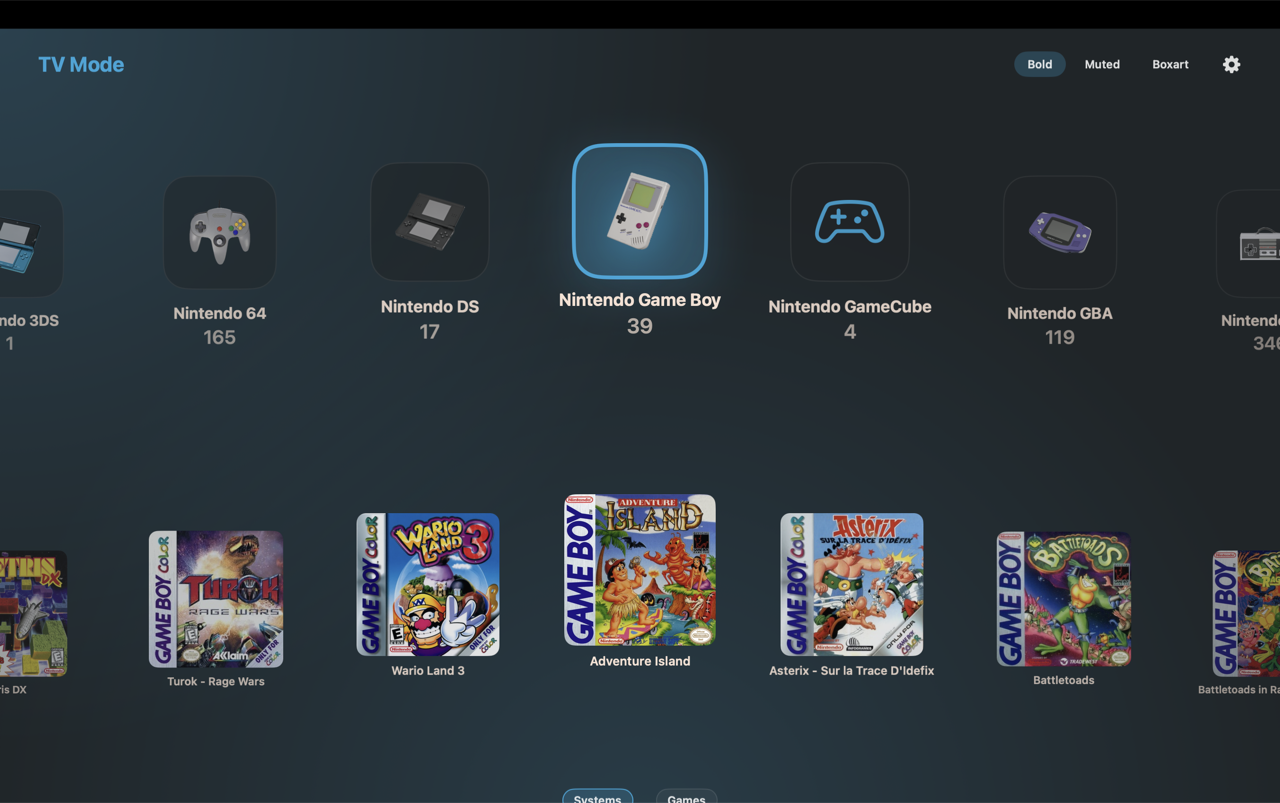
TV Mode browsing with animated backgrounds, box-art focus effects, and gamepad navigation
What You Get
- Gamepad Navigation: D-pad / analog stick scrolls through games, A selects, B backs out, stick-click toggles the sidebar — full traversal without ever touching the keyboard or mouse
- Animated Backgrounds: Backdrops follow the focused game's box art and system artwork, with auto-repeat navigation that speeds up the longer you hold
- Box-Art Focus: Focused entries scale up with cleaner visuals and pin the background fill to the image size
- Short-List Mode: Compact title-only list for very large libraries
- Filter & Sort: TV Mode maintains your filter and ROM selections on state restoration; reset filters at any time
- Resolution-Adaptive Scaling: Auto-scales the UI relative to your screen resolution for a consistent feel on 1080p, 1440p, and 4K displays
- Core Download Overlay: Trigger core downloads directly from TV Mode — no need to drop back to the desktop
- Auto-Fullscreen: Optionally returns to your previous fullscreen state when you exit TV Mode; toggle it in settings
Shader Collection
Transform your gaming experience with our curated collection of high-quality Metal shaders. Each shader is optimized for macOS and designed to enhance or authentically reproduce classic gaming visuals.
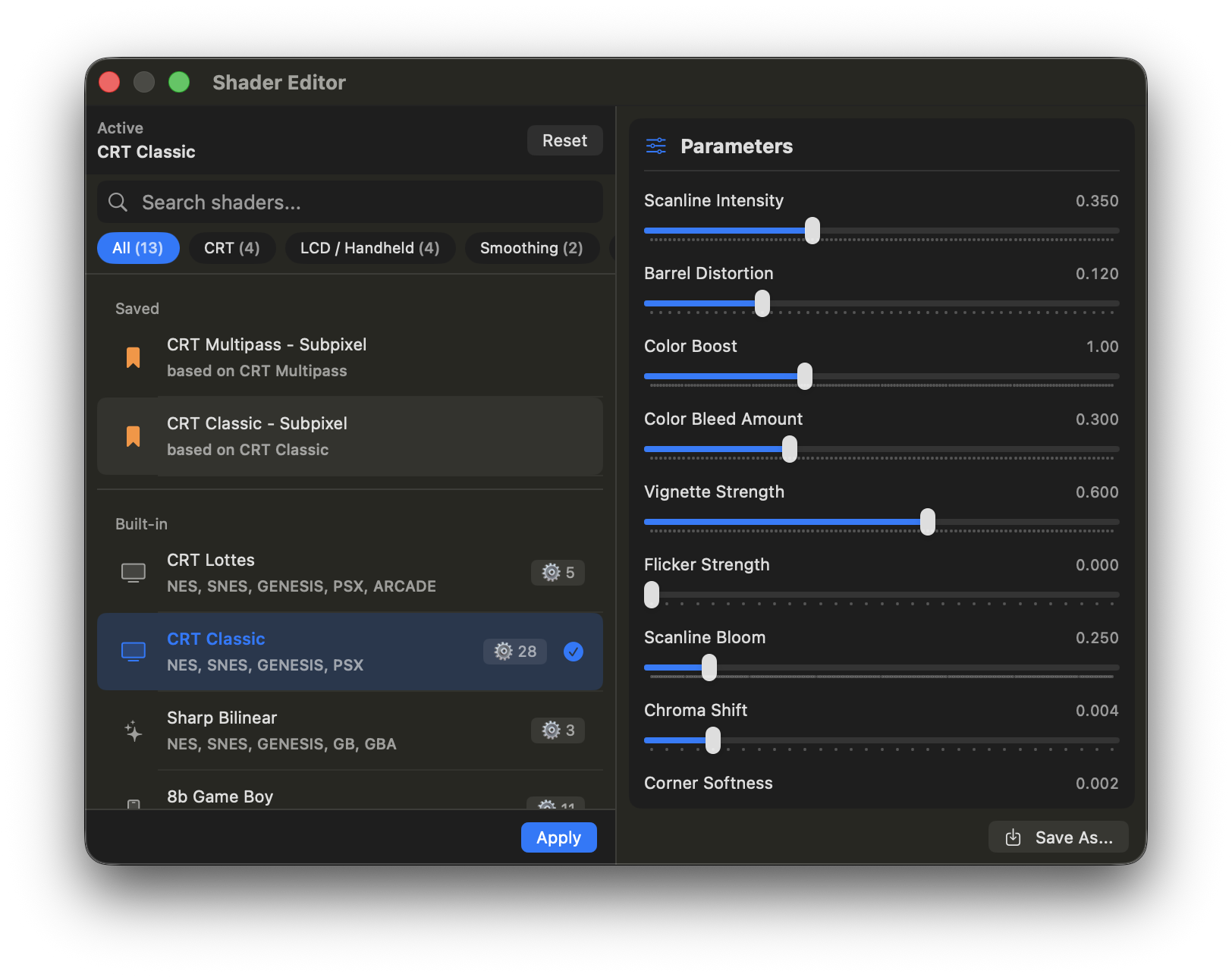
The shader picker interface allows real-time preview and adjustment
Built-in Metal Shaders
TruchiEmu ships with 17 built-in Metal shaders that work out of the box — no downloads, no setup. Five favorites below; the picker holds all 17 including CRT Pittman and the slang collection:
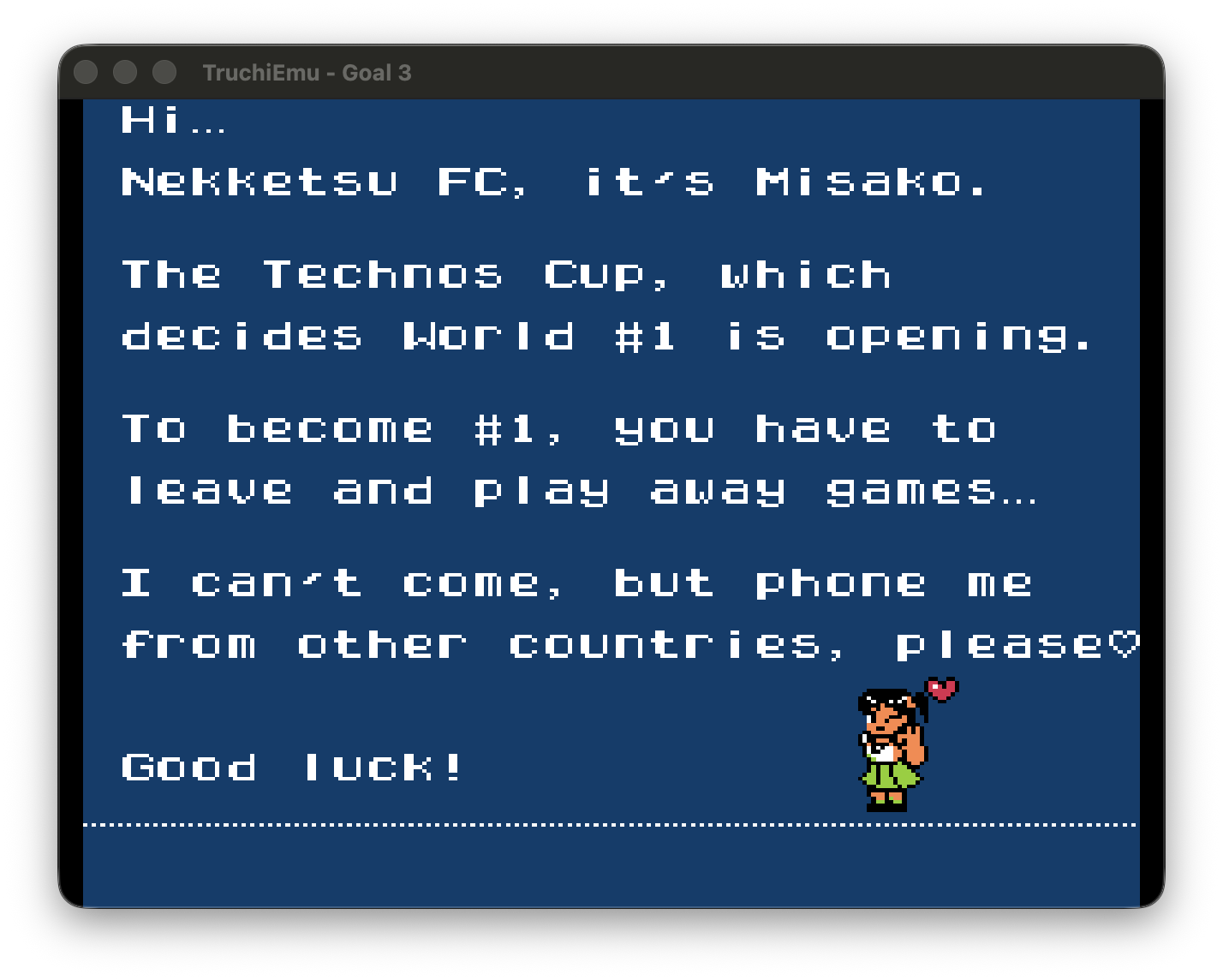
Passthrough
No post-processing. Integer-scaled raw pixels rendered exactly as the original hardware intended. Perfect for purists who want unfiltered, authentic visuals with sharp pixel edges.
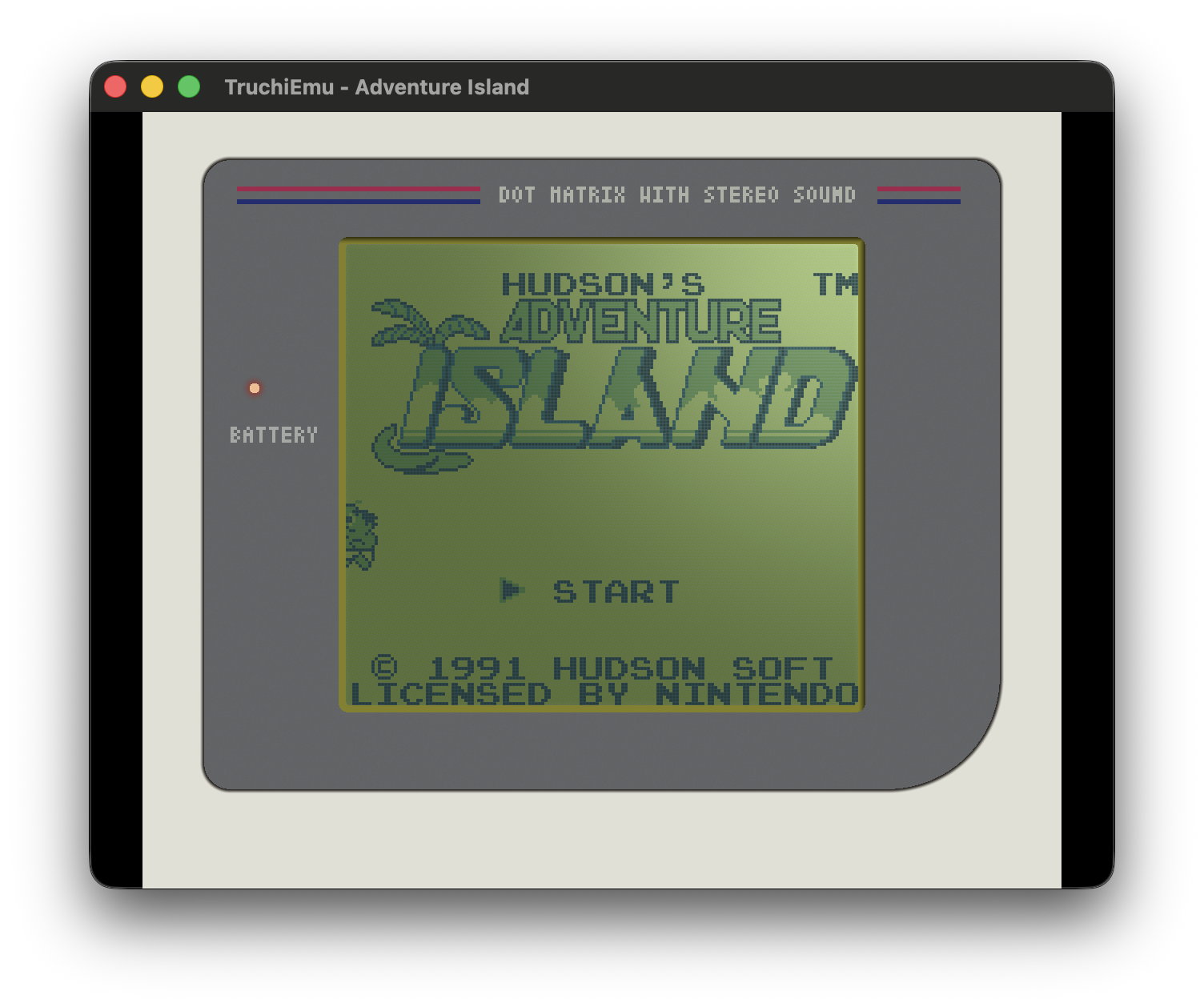
8b Game Boy
High-fidelity Game Boy DMG simulation with a customizable bezel, dynamic lighting, grid pattern, and the characteristic monochrome display feel.
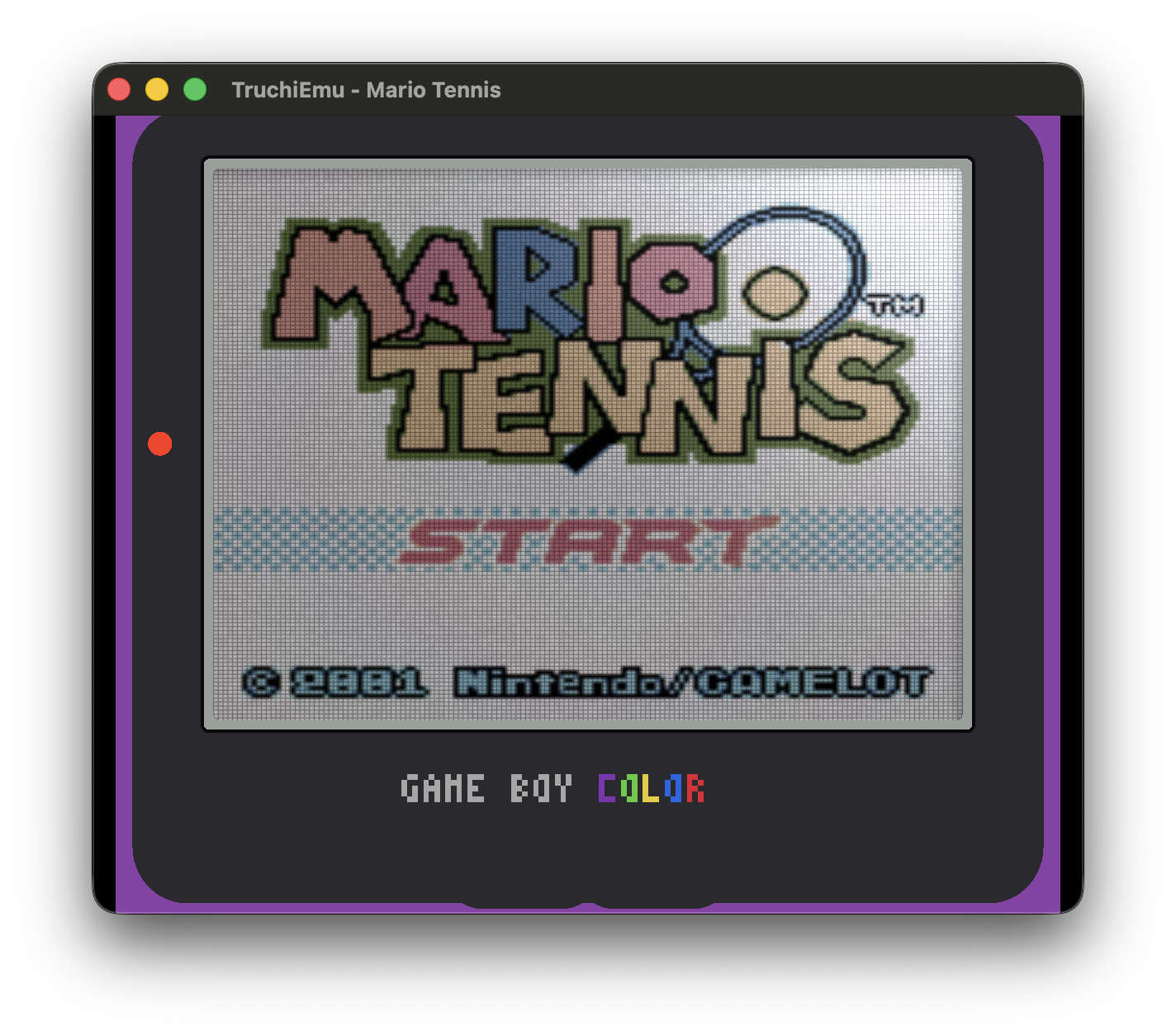
8b Game Boy Color
Game Boy Color LCD simulation with temporal feedback, ghosting, iridescent effects, and customizable shell colors (Berry, Grape, Onyx, Glacier, and more).
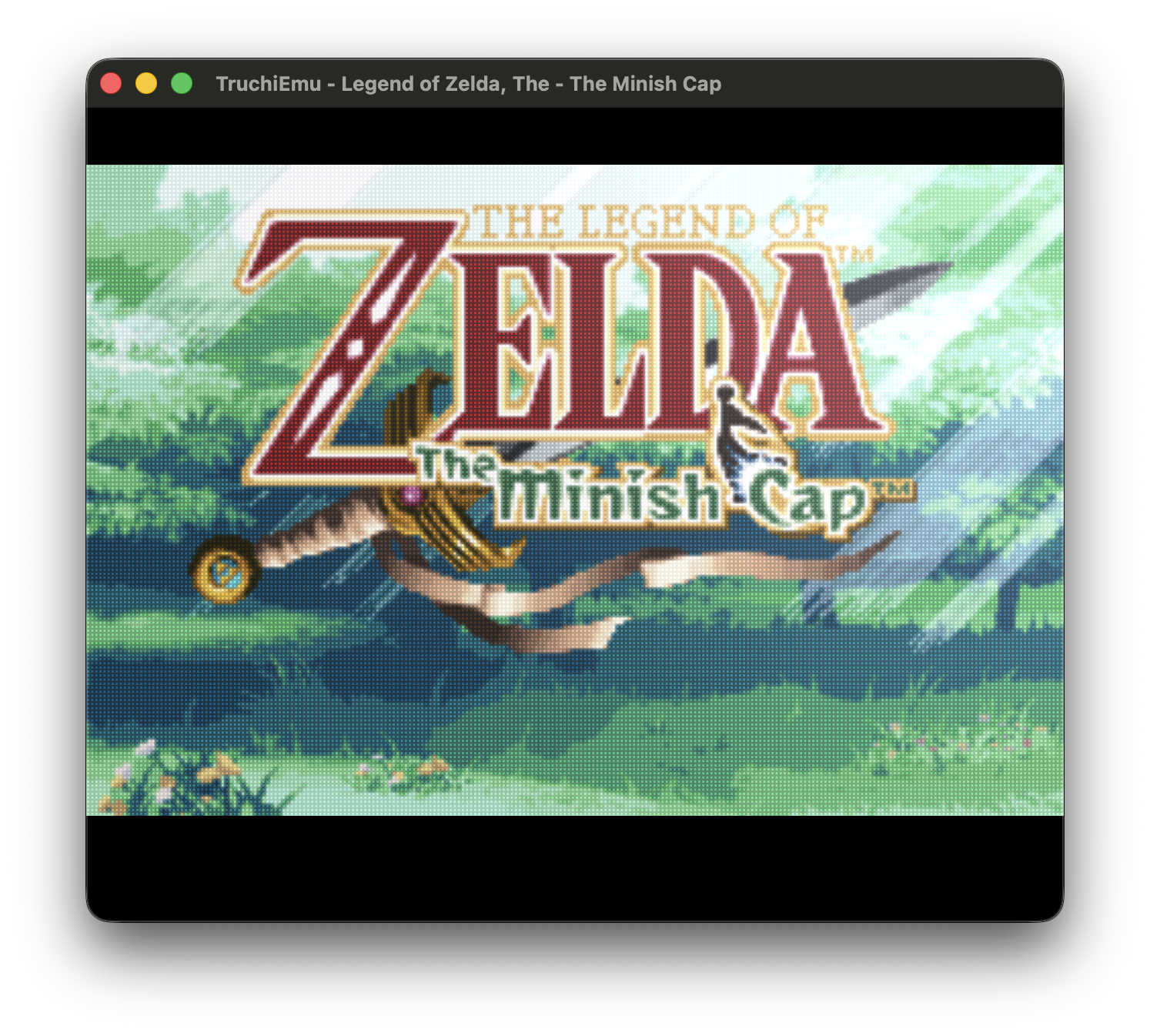
GBA (Advanced LCD)
Advanced Game Boy Advance LCD simulation with ghosting, grid pattern, metallic reflections, and configurable light position.
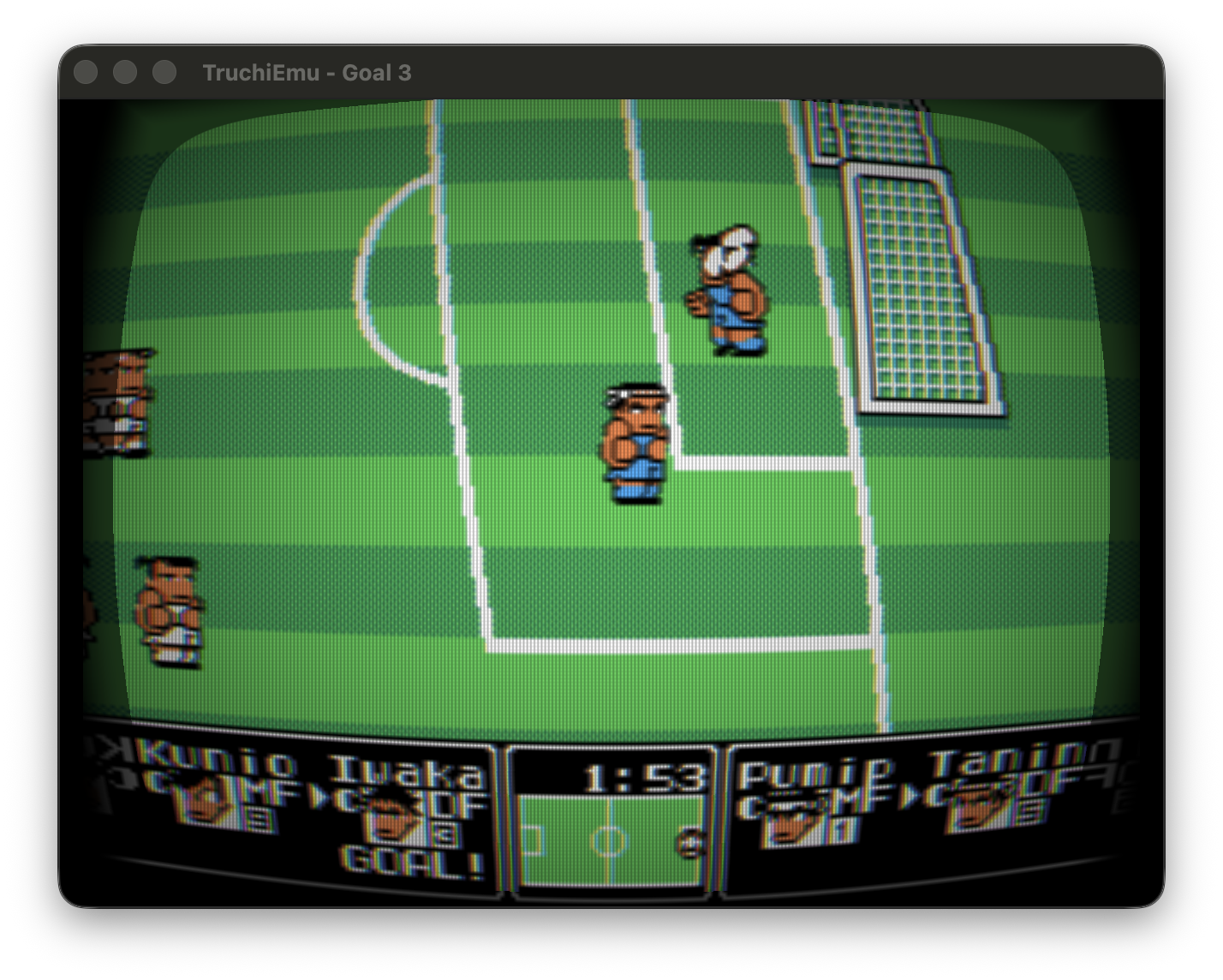
CRT Classic
Classic CRT scanlines with barrel distortion, vignette, chromatic aberration, phosphor masking, and color bleed. Highly customizable with over 20 parameters.
Slang Shader Presets
Beyond the built-in Metal shaders, TruchiEmu also runs RetroArch .slangp presets via librashader. Around 1,800 community-made presets from the libretro slang-shaders project are bundled and discovered automatically. Browse them in the All and Slang tabs of the shader picker. Drop new .slangp files into ~/Library/Application Support/TruchiEmu/SlangPresets/ and they appear automatically.
Shader Customization
Each shader includes adjustable parameters to fine-tune the effect:
- Intensity Sliders: Adjust the strength of each effect
- Parameter Presets: Quick settings for different display types
- Real-time Preview: See changes instantly as you adjust
- Per-Game Settings: Save shader preferences for individual games
- Global Defaults: Set system-wide shader preferences
Learn more about the Shader System →
New: CRT Pittman with faux-NTSC composite and bloom, plus an optional 3D cabinet frame. See CRT Pittman and 3D Cabinet.
Performance Impact: Passthrough and Scale Smooth have minimal performance impact. CRT shaders (Multipass, Lottes, Classic) and LCD simulations use more GPU resources. Most modern Macs can run any shader at full speed.
Library Management
Organize your game collection with powerful library management features designed for serious collectors and casual gamers alike.
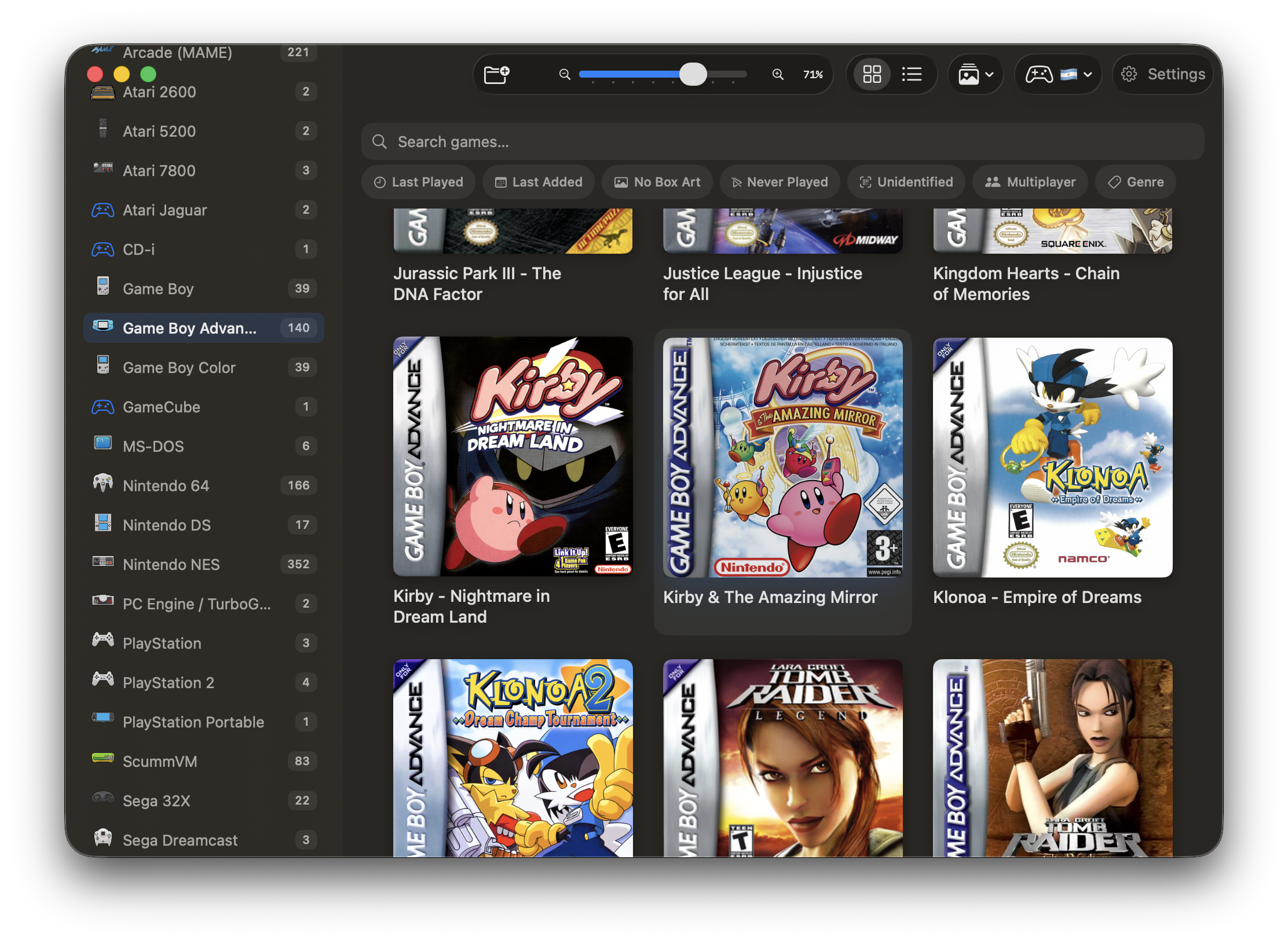
Your games are automatically organized with cover art and metadata
Automatic Organization
- Smart Detection: Automatically identifies games from file hashes against game databases, including arcade sets
- Metadata Fetching: Downloads game descriptions, release dates, publisher, and genre automatically
- Cover Art Sources: ScreenScraper and Libretro CDN with configurable priority; interactive Box Art Picker lets you swap alt artwork per game; PPSSPP asset downloads are auto-applied
- System Categorization: Groups games by original console/system
- Achievement Detection: Identifies games with RetroAchievements support and shows the RA hash in the Game Detail view
- iCloud Support: ROMs stored in iCloud download on demand instead of showing as empty files
- Removal Notifications: When ROMs are removed from a watched folder, TruchiEmu posts a notification and updates the library automatically
- Holo Card Effects (Beta): Library cards show a foil sheen with light-spot glare that follows the cursor and pauses during scroll
- Adaptive Box Art: Mixed portrait and landscape covers fit without crop; fixed Vertical, Box, and Landscape styles also available
- Game Info: The Game Detail view shows OpenCritic scores and HowLongToBeat times when matched, with Time Played and Longer to Beat sorts in the library
Grid View
Visual grid with cover art thumbnails. Perfect for browsing large collections.
- Adjustable grid size via zoom slider
- Sort by name, last played, last added, time played, or longer to beat
- Quick search and filter
List View
Detailed list with metadata and stats. Great for sorting and organizing.
- Compact display for large libraries
- Quick status indicators
Collections & Categories
Organize your games with custom categories and built-in filters:
- Custom Categories: Create named categories with SF Symbol icons, custom uploaded icons, and per-category colors
- Favorites: Quick access to your must-play titles via the favorites filter
- Recently Played: Automatically tracks and displays your most recent sessions
RetroAchievements Integration
Earn achievements while playing classic games! TruchiEmu integrates seamlessly with RetroAchievements.org to add modern achievement hunting to retro gaming.

Track your progress and compare with friends on the global leaderboard
Achievement Tips:
- Ensure you are using verified ROM files that match the RetroAchievements database hashes.
- Check the achievement lists on the RA website to plan your approach for difficult trophies.
- Join the RetroAchievements community to track your progress against other players.
- Hardcore Mode: Enable Hardcore Mode via settings to block save states, rewind, slow motion, and cheats, which is required for earning Hardcore-tier achievements.
- First-Run Enable Prompt: TruchiEmu offers to enable RetroAchievements (and Hardcore Mode) during the Setup Wizard, with cache-import progress for offline achievement data.
- Game Detail View: The Game Detail page shows the game's RA hash and progress on already-unlocked achievements, with the correct hash shown automatically.
Important: Achievements only work with verified ROM files that match the RetroAchievements database hashes. Use No-Intro verified dumps for best compatibility.
Emulation Cores
TruchiEmu is powered by libretro, a universal emulation API. Each system runs on a dedicated core — think of them as plug-in engines.
- Core Downloader: Browse, install, and update cores with one click, without leaving the app
- Custom Import: Install a core from a local file, including Switch support via suyu (needs your own prod.keys)
- MAME & Arcade: Keep arcade sets as .zip; the library hides non-game BIOS and device files
- Core Options: Tune video, audio, and system settings per game, per system, or app-wide
Save State Features
Save states allow you to capture and restore your exact position in a game instantly, providing a modern safety net for retro gaming.
Visual Save States
- Automatic thumbnail capture for every save slot
- Visual grid browser for quick state selection
- 11 slots per game: one Auto slot plus slots 0 through 9
- Timestamps for each captured state
Save State Manager
The integrated save state browser provides a visual way to manage your progress:
- Thumbnail Grid: Browse your saved positions visually via 320x240 previews
- Slot Management: Easy access to slots 0 through 9
- Metadata: View exactly when each state was created
- Automated Paths: Consistent folder structure for easy backup and migration
Themes & Appearance
Make TruchiEmu yours with 16 named accent color themes plus a Custom theme — inspired by gaming legends from Samus to Doom — plus light/dark appearance modes and tinted surfaces.
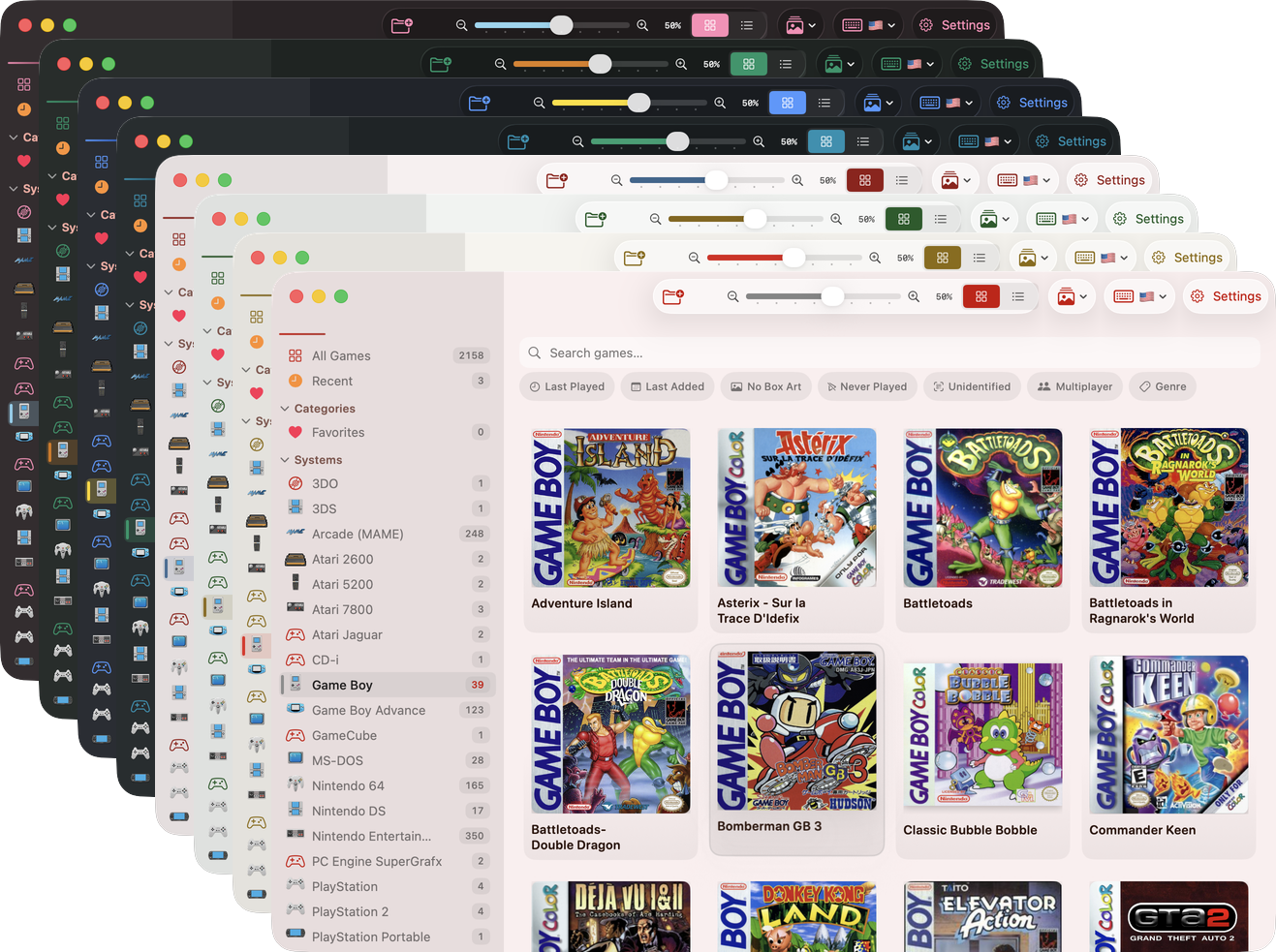
All 17 TruchiEmu themes (16 curated + 1 custom)
What You Can Customize
- 16 Curated + 1 Custom: Accent palettes organized into Standard (Samus, Chocobo, Protoss, Joker, Geralt, Mega Man, Custom) and Gaming (Mario, Luigi, Sonic, Half-Life, Kratos, Kirby, Zelda, Pikachu, Doom, Master Chief) categories
- Appearance Mode: Light, Dark, or Automatic — follow your system preference or override it per-app
- Custom Colors: Pick any color as your accent with the built-in Color Picker
- Tinted Surfaces: Subtle accent color tinting on window, sidebar, and toolbar backgrounds
- Toolbar Accent: Optionally color toolbar icons with the accent color instead of system defaults
- Per-Mode Adaptations: Many themes automatically adjust their accent for better contrast in light vs. dark mode
Bezels & Screen Framing
Enhance your immersion with custom bezels that frame your game screen, perfect for filling the void on modern wide-aspect displays.
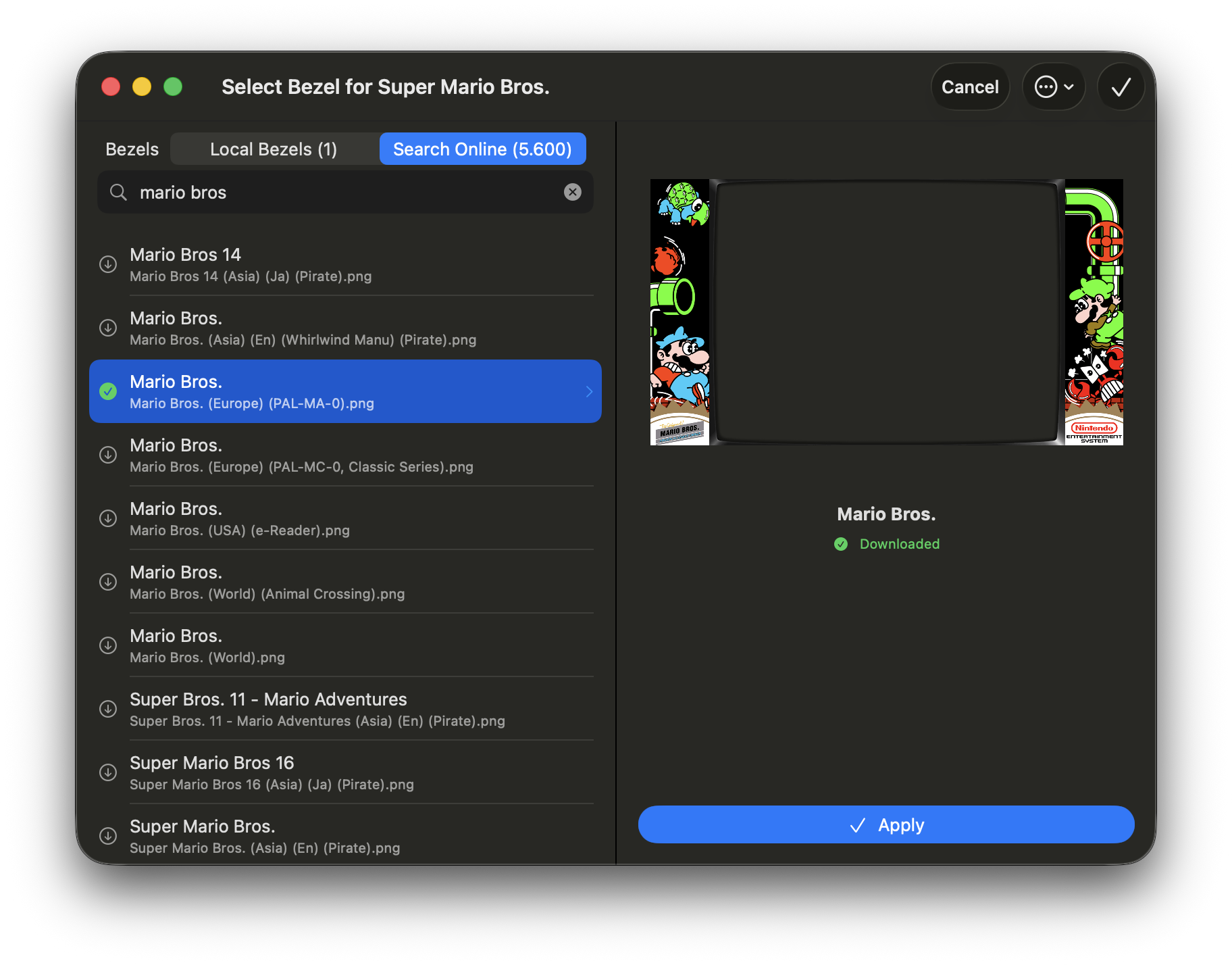
Browse and download high-quality bezels tailored to your system
- Automatic Mapping: Bezels are automatically matched based on the game name, following a resolution cascade (user override → exact match → cleaned name → fuzzy match → no bezel).
- Bezel Browser: Integrated downloader for The Bezel Project collection.
- Custom Import: Import your own bezel images for any game.
Controller Support
Plug in a gamepad and it just works. TruchiEmu supports Xbox, PlayStation, MFi, Switch Pro, and most USB/Bluetooth pads — up to 4 players.
What You Get
- Plug and Play: USB and Bluetooth controllers are recognized the moment you connect them
- Broad Compatibility: Works with Xbox, PlayStation, MFi, and Switch Pro pads, plus most generic controllers
- Smart Defaults: TruchiEmu picks a sensible button layout based on the controller type and the system you're playing
- Per-Controller Profiles: Each controller you connect gets its own mapping, remembered for next time
- Per-System Overrides: A PlayStation pad can be SNES-style on one system and Genesis-style on another
- Multi-Player Keyboard Mapping: Multiple players can share one keyboard — combine a gamepad for P1 and keyboard for P2 (or vice-versa)
- Gap-Slot Prioritization: When a new controller connects, TruchiEmu prioritizes the first empty slot before substituting a keyboard player — your P2 stays P2
- Disable & Reset: Disable a stuck controller or reset the controller list without quitting the app
- Replace Keyboard with Controller: Toggle whether a freshly-connected controller should automatically take over a keyboard-assigned slot
- Dead Zone & Sensitivity: Tune stick response so drift doesn't wander the character
- Remap Anything: Swap any button to any other button, including face, shoulder, and stick clicks
- Controller Test Sheet: A live pad visualizer with stick calibration — verify a new pad before you play
- Analog Mouse: Use a stick to control the mouse in DOS and ScummVM games — see the Analog Mouse section for full details
- Keyboard Shortcuts: System hotkeys for save states, screenshots, and other common actions
Analog Mouse Support
TruchiEmu lets you use your gamepad's analog sticks to control the mouse cursor in DOS and ScummVM games, with configurable buttons for mouse clicks and D-pad for keyboard inputs.
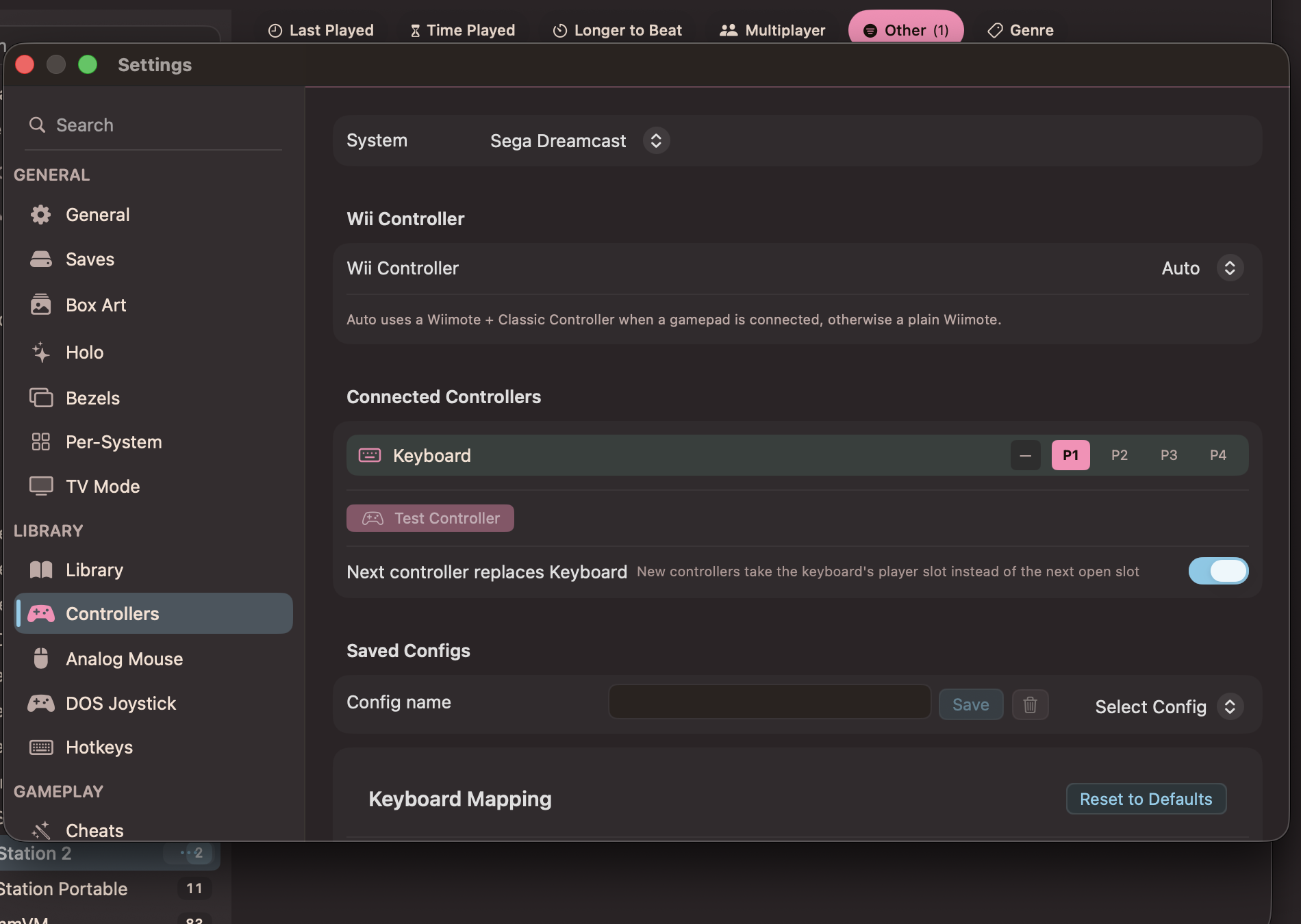
Controller mapping with sensitivity, dead zone, and button mapping
Key Features
- Analog Stick to Mouse: The primary analog stick (left or right) controls the cursor at 60fps with configurable sensitivity
- Secondary Stick for Fine Control: The secondary analog stick moves the mouse at 1/5 speed for precise cursor placement
- D-Pad as Keyboard: D-pad sends arrow keys, Start sends Enter, Select sends Space
- Configurable Button Mapping: Assign left, right, and middle click to any gamepad button
- Per-System & Per-Game: Independent settings for DOS and ScummVM, with per-game overrides
Comfort Tip: Adjust sensitivity and dead zone in Settings → Analog Mouse. Use the secondary stick for precise pixel targeting, and map mouse buttons to comfortable gamepad buttons for your preferred play style.
Point & Click Guide
Stuck on a puzzle? The built-in Game Guide sidebar brings progressive hints and full walkthroughs directly into your game window. It automatically appears for adventure and point-and-click games, pulling content from the Universal Hint System (UHS) and GameFAQs.
Key Features
- Progressive Hints (UHS): Spoiler-free hints that reveal one at a time — get just enough help without ruining the puzzle
- Full Walkthroughs (GameFAQs): Complete text walkthroughs as a fallback when UHS hints aren't available
- Gamepad Navigation: Browse the guide with your controller — analog sticks scroll, A/B buttons navigate, R3/L3 toggles the sidebar
- 387+ Game Mappings: Pre-matched UHS guides for classic adventures including Monkey Island, Broken Sword, Grim Fandango, and more
- Automatic Detection: Adventure and point-and-click games are identified by genre or system (ScummVM games always qualify)
Quick Access: Press Cmd+J or click the guide toolbar button to open the sidebar. For DOS and ScummVM games, input capture is automatically released when the guide opens and resumed when it closes.
Training Mode
TruchiEmu's training mode overlay provides P2 automation tools for fighting games, letting you control the dummy player to practice combos, defense, and setups.
Key Features
- Dummy Control: Configure P2 stance, guard behavior, wake-up tech, and reversal actions for realistic practice
- Sequence Programming: Build frame data sequences of moves for P2 to execute on configurable triggers
- Input Recording: Record P1 inputs via tape deck and play them back as P2 with multiple slots
- Input Display: Real-time visualization of P1 and P2 inputs with move notation tokens
- Move Integration: Browse character moves and link them to training sequences directly from the overlay
Pro Tip: Use training mode in combination with the Move List overlay to learn character-specific combos and special moves. Program P2 to block or punish specific scenarios.
Move List & Fight Data
Never forget a special move again. The move list overlay displays fighting game move notations directly on screen, powered by an extensive library of curated fight data for over 200 fighting games.
Key Features
- On-Screen Display: Move notations are shown as an overlay during gameplay, categorized by type
- Visual Tokens: Move notations use visual tokens for directional inputs, button combinations, and special conditions
- Extensive Fight Data Library: Over 200 curated fight data sets covering classic and modern fighting games across NES, SNES, Genesis, Arcade, PlayStation, and more. Games include Street Fighter II, Mortal Kombat, King of Fighters, Tekken, Samurai Shodown, and dozens more.
- Per-Game Move Sets: Moves are automatically loaded based on the game being played
- Search & Filter: Quickly find specific moves by name, input type, or character
Time Machine
TruchiEmu's Time Machine brings rewind, fast-forward, and slow-motion controls directly to the game toolbar. The Setup Wizard offers an optional Time Machine step on first launch, and the controls stay available during gameplay for the ultimate sandbox.
Key Features
- Rewind: Step backward through recent frames to retry a missed jump, a botched combo, or a fatal hit without reaching for a save state
- Fast Forward: Skip slow dialogue, grinding, or long cutscenes while keeping audio pitched to playback speed
- Slow Motion: Study frame-perfect sequences at reduced speed — ideal for fighting game combo practice or tricky platformer setups
- Hardcore-Aware: When RetroAchievements Hardcore Mode is active, Time Machine controls are disabled alongside save states and cheats
- Per-Core Compatibility: The Time Machine uses save-state deltas; some cores (e.g. Dolphin) with known crash issues are gracefully excluded, and Play! (PS2) save-state warnings surface clearly
Where to find it: Time Machine controls appear on the in-game overlay toolbar. Build them into the Setup Wizard during first launch from Settings → Time Machine, where you can also configure rewind buffer depth, slow-motion ratio, and hotkeys.
Stream Recording
Record your gameplay sessions or stream live to Twitch, YouTube, or a custom RTMP server — all without leaving the game. Encoding runs on your Mac hardware, so the speed impact stays small.
Key Features
- Local Recording: Capture gameplay to local files in H.264, HEVC, or lossless ProRes 422/4444
- Live Streaming: Stream directly to Twitch or YouTube, or point to any custom RTMP endpoint with stream-key verification (Twitch/YouTube give immediate success/failure feedback)
- Resolutions: Native / 720p / 1080p / 1440p / 4K in the resolution picker; streaming always uses H.264
- Hardware Encoding: Your Mac encodes video and audio in hardware for minimal slowdown
- Rolling Video Buffer: Tap a "save last moments" hotkey to write the past few seconds to disk — perfect for clip-worthy plays you didn't see coming
- Share Button: Single-press and long-press share actions, configurable per game
- Record With or Without Shaders: Choose whether the recording captures the post-shader drawable or the raw core frame
- In-Game Controls: Start/stop recording from the game toolbar without breaking your flow; visibility of the record button adapts to your current recording state and settings
Where to find it: Configure streaming in Settings → Streaming & Media — separate tabs for Twitch, YouTube, custom RTMP, and the share button behavior.